 |
|
|


 |

 |
|
 |
 |
Prepress • Estimate Guide • Printing/Copying • Bindery • Quote • Font Submission • Printing Tools |
 |
More and more, our customers are bringing in their own work to be printed. There are several programs that make this process easier by providing tools for the user to collect everything needed for their prints. This saves time and hassle for both the customer and print provider. Below are some helpful instructions for doing this successfully.
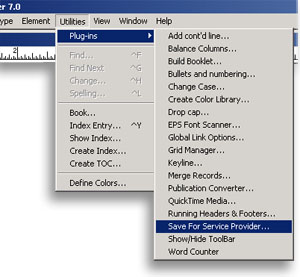 |
Create a folder on your desktop and name it Print Job. With your PageMaker file open go to the Utilities drop down menu and select Plug-ins. Select the Save For Service Provider... option. In the Save For Service Provider window click the Preflight pub button.

It will scan your file and display any errors before you package it. If everything checks out ok you are ready to package the file. If there are errors, they will need to be resolved before packaging. Once everything is resolved select the Package... button in the lower left corner. In the Save As window, put a check in the box in front of Copy fonts: and make sure the radio button for All is filled in. Now find the folder that you created earlier on your desktop and save your file there. This will create several files in that folder. Put all of those files on a disk to bring with you. Please leave them all in the folder.
If you need help, call us at Hiatt Printing and someone will be able to assist you.
Adobe InDesign Be sure that Copy Fonts, Copy Linked Graphics and Update Graphic Links In Package are all checked. Type a name for the folder of all the packaged files and save it to the desktop. Click Package. This will create several files in that folder. Put all of those files on a disk to bring with you. Please leave them all in the folder.
Microsoft Publisher Fill in the radio button below A:\, select Browse... and select the folder you created on your desktop. Click OK. Click Next. Be sure to check the three boxes marked Embed True Type fonts, Include linked graphics and Create links for embedded graphics, then click Next. In the next window click Finish. This will create several files in the folder you created earlier. Check the box marked Print a Composite and click OK. Bring it with your disk. Put all of those files on a disk to bring with you. Please leave all the files in the folder.
Microsoft Publisher 2007 Fill in the radio button below A:\, select Browse... and select the folder you created on your desktop. Click Finish. Check the box marked Print a composite proof and click OK once it has been packaged successfully. This will create a .zip file in the folder you created earlier. Put all of those files on a disk to bring with you with your printed composite.
Where's my program?
Open the InDesign file to be packaged. In the File drop down menu select Preflight... If everything checks out ok you are ready to package the file. If there are errors, they will need to be resolved before packaging. Once everything is resolved select the Package... button. Fill out the information needed in the form and choose continue.

Create a folder on your desktop and name it Print Job. With your Publisher file open go to the File drop down menu and select Pack and Go. Select the Take to a Commercial Printing Service... option. This will open the Pack and Go wizard. Click Next.
Create a folder on your desktop and name it Print Job. With your Publisher file open go to the File drop down menu and select Pack and Go. Select the Take to a Commercial Printing Service... option. This will open the Take to a Commercial Printing Service task pane. In the "How will this publication be printed?" drop down, make sure Commercial Press is selected. Take note of any issues in the window below. In the Export section at the bottom, check both boxes. Click Save.

There are other programs that will assist you in packaging your file. Also, even if your program will not, there are steps you can take to make the process go a little smoother. Contact us and we will help you determine what you can do.